 Help Center
Build Apps · Edge
Modbus TCP
Last updated June 10, 2026, 12:21 PM UTC · fuuz.com/help/modbus-tcp
Modbus TCP is a communication protocol used in industrial automation and control systems for transmitting data over Ethernet networks. It extends the original serial Modbus protocol to work over TCP/IP, and is widely used for communication between PLCs, RTUs, sensors, and other industrial equipment.
Connector type: Physical device connector — requires the Modbus device driver and is added as a device connection on the Edge Gateway.
Key characteristics include:
- Ethernet-Based Communication: Works over Ethernet networks, allowing faster and more reliable data communication than serial Modbus.
- Client-Server Architecture: A client device initiates read/write requests; a server device (typically a PLC or RTU) responds.
- Open Protocol: Open and well-documented, promoting interoperability between devices from different manufacturers.
- Request-Response Model: A client sends a request and the server responds with the requested data or acknowledges the action.
- Function Codes: Specify the type of operation (read/write holding registers, coils, input registers, etc.).
- Data Types: Supports binary (coils), 16-bit integers (holding registers), and 32-bit floating-point numbers.
- Addressing: Devices are identified by IP address and device ID.
- Broadcast Messaging: A client can send a message to all devices on the network (use with caution).
- Error Handling: Includes error-checking to detect transmission issues.
- Security Considerations: Modbus TCP has no strong built-in security; use it within a secured network or with additional security measures.
Configuration
- Host: The hostname or IP address of the Modbus device.
- Port: The port used to connect to the Modbus device.
Functions
Read Coil
Reads a sequence of coils from a Modbus device.
- Address: The address to start reading coils from.
- Length: The number of coils to read from the starting address.
Write Coils
Writes values to a block of coils on a Modbus device.
- Address: The starting address to write values to.
- Values: An array of booleans to write to a block of coils starting at the address.
Read Discrete Input
Reads a sequence of discrete inputs from a Modbus device.
- Address: The address to start reading discrete inputs from.
- Length: The number of discrete inputs to read from the starting address.
Read Holding Register
Reads a sequence of holding registers from a Modbus device.
- Address: The address to start reading registers from.
- Length: The number of registers to read from the starting address.
Write Holding Registers
Writes values to a block of holding registers on a Modbus device.
- Address: The starting address to write values to.
- Values: An array of UInt16s to write to a block of registers starting at the address.
Read Input Register
Reads a sequence of input registers from a Modbus device.
- Address: The address to start reading registers from.
- Length: The number of registers to read from the starting address.
Testing
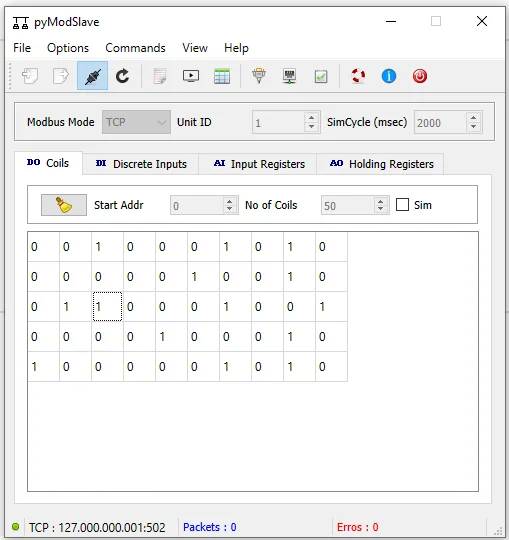
pyModSlave (pypi.org/project/pyModSlave) lets you start a TCP Modbus server emulator. Once it is started and connected, the address to connect to is listed at the bottom of the app window. Each of the Coils, Discrete Inputs, Input Registers, and Holding Registers can be changed to test.
See Also