 Help CenterHelp Center
Getting Started · User Guide
Article Type: Concept
Audience: All Users, Enterprise Administrators, Application Administrators, Developers
Module: User Guide - Platform Architecture
Applies to Versions: All Versions
The Fuuz Industrial Operations Platform is built on a sophisticated four-tier architecture designed to provide enterprise-grade security, flexibility, and scalability. Understanding how Enterprises, Organizations, Applications, and Environments work together is essential for effective platform navigation, user management, and application deployment.
This article provides a comprehensive overview of the Fuuz Platform's organizational structure, helping users understand how to navigate between different areas of the system, manage access across multiple business units, and leverage different environments for development, testing, and production operations.
Note: Beginning in Q1 2026, Fuuz is transitioning terminology from "Tenants" to "Applications" or "Apps" throughout the platform. This article uses the updated terminology. Historical references to "Tenants" should be understood as "Applications." Key Takeaway: The Fuuz Platform uses a hierarchical structure where your Enterprise contains Organizations (logical groupings), which contain Applications (data isolation boundaries), and each Application can exist across multiple Environments (Build, QA, Production). This architecture ensures data isolation, security, and operational flexibility.Unlike traditional multi-tenant cloud software where all customer data resides in a shared database, Fuuz employs an Enterprise Mesh Architecture that combines the scalability benefits of cloud services with enhanced security through data isolation. This hybrid approach provides each customer with dedicated services for their applications and data while leveraging a centralized service mesh for standard platform features and functions.
The Enterprise Mesh Architecture was designed specifically to address cybersecurity risks inherent in traditional multi-tenant systems. By keeping customer data isolated rather than intermingled, Fuuz significantly reduces the attack surface and potential blast radius of any security incident. This architecture also enables the platform's exceptional flexibility, allowing customers to create custom fields, tables, screens, and workflows without impacting other customers or requiring platform-wide changes.
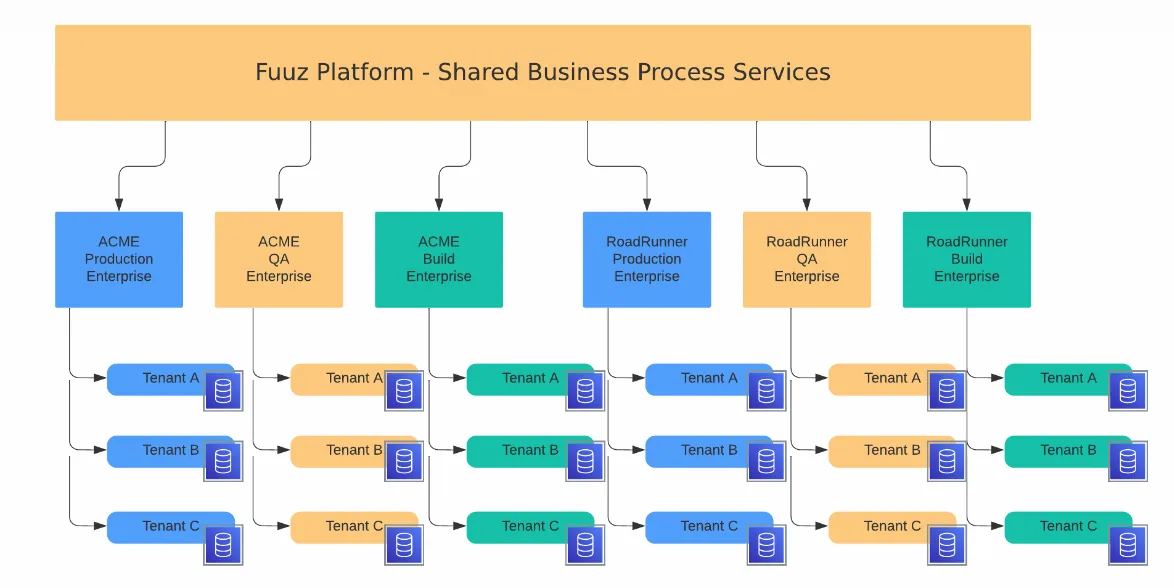
The Fuuz Platform organizes access and data through four hierarchical levels, each serving a distinct purpose in your operational structure:
| Tier | Purpose | Example |
|---|---|---|
| Enterprise | Top-level organizational boundary, identified by subdomain | acme.fuuz.app |
| Organization | Logical grouping for business units, regions, or divisions | Southern Region, Engine Block Division |
| Application | Data isolation boundary for sites or functional areas | Chicago Plant, Dallas Distribution |
| Environment | Instance for specific purpose (development, testing, production) | Build, QA, Production |
Fuuz offers multiple deployment models to meet varying infrastructure, security, and scalability requirements. Contact the Fuuz sales team for detailed information on current offerings and licensing options suitable for your organization.
| Deployment Model | Description | Typical Use Case |
|---|---|---|
| Fuuz Cloud | Fully managed AWS-hosted platform with infinite horizontal and vertical scaling | Organizations seeking maximum scalability with minimal infrastructure management |
| Kubernetes Global | Self-hosted Kubernetes deployment with helm chart, includes Build/QA/Production namespaces | Large enterprises requiring on-premise hosting with multiple sites and unlimited Organizations |
| Single Server | Docker-based deployment limited to single Organization, single Environment (recommended: 8-12 cores, 32GB RAM, 256GB storage) | Single facility operations, site-based deployments with limited scale requirements |
| Developer | Single server with limited integrations, flows, apps, and topics; time-limited trial with low-cost extensions available | Learning platform features, small-scale projects, proof-of-concept, single workcenter deployments |
| Private Cloud | Dedicated cloud infrastructure managed by Fuuz or customer | Organizations with specific regulatory or security requirements for isolated cloud resources |
Example 1: Regional Manufacturing Company
Example 2: Diversified Industrial Company
Example 3: Single Site with Multiple Applications
Applications provide complete data isolation by default, but organizations can implement various data sharing patterns based on their operational needs:
Your Enterprise represents your organization's top-level boundary within the Fuuz Platform and is identified by a unique subdomain. The subdomain typically corresponds to your company's domain name.
URL Pattern Examples:
https://acme.fuuz.apphttps://qa.acme.fuuz.apphttps://build.acme.fuuz.apphttp://server-ip or custom domainOrganizations are logical groupings of Applications and are visible in the user interface. Users with access to multiple Organizations can navigate between them, though they are actually accessing the Applications within those Organizations rather than the Organizations themselves.
Note: In Single Server deployments, Organizations are limited to one per installation. The Organization remains visible in the UI but users cannot switch between Organizations since only one exists.Users can access multiple Applications if their Enterprise User account has been granted appropriate access. The Application selector is located in the bottom right corner of the Fuuz interface. The displayed name indicates your current Application context. Click this section to view all Applications you can access, then select your desired Application to switch contexts.
Navigation Tip: The Application selector in the bottom right corner shows your current Application and provides quick access to switch between all Applications where you have been granted access. Your access to Applications is controlled by Enterprise Administrators.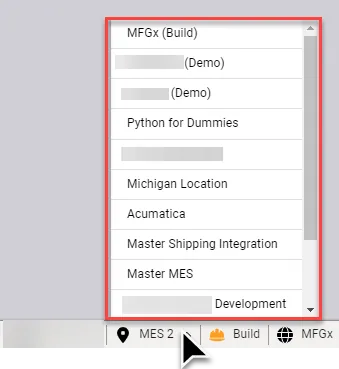
You can identify your current Environment through the Environment indicator in the bottom right corner of the Fuuz interface (the "tray") and through the URL in your browser's address bar. Always verify your Environment before performing operations to ensure you're working in the intended context.
Environment Indicators:


The Enterprise level provides complete data isolation from all other Fuuz customers. This isolation extends to dedicated application services, ensuring that performance issues, security incidents, or customizations in one customer's Enterprise cannot impact another customer's operations.
Larger organizations may choose to deploy multiple Enterprises when business units operate independently or require complete separation. Each Enterprise maintains its own subdomain structure and independent management.
Organizations serve as logical groupings within an Enterprise to help define business structure. An Organization might represent a geographic region (Southern Region, EMEA), a business division (Engine Block Division, Aftermarket Services), a campus, or any other organizational construct that makes sense for your operations.
Organization Capabilities:
Organization Limits by Deployment:
Applications provide the primary data isolation boundary within your Enterprise. Each Application maintains its own data, users, roles, and application configurations, though the platform architecture remains consistent across all Applications.
When to Use Separate Applications:
| Consideration | Recommendation | Rationale |
|---|---|---|
| Time Zone Differences | Use separate Applications | Each Application operates in a single time zone for scheduling, reporting, and shift management |
| Currency/Localization | Use separate Applications | Different languages, currencies, or regulatory requirements are more easily managed in separate Applications |
| Operational Models | Consider separate Applications | Discrete, process, batch, or other distinct operational models may require different data structures |
| IT Team Size | Separate Applications can simplify | User management and security administration are simpler with isolated Applications |
| Cost Considerations | Balance against benefits | Additional Applications may increase costs but can reduce operational complexity |
| Portal Requirements | Use separate Applications | Customer, supplier, or employee portals should typically be isolated in dedicated Applications |
| ERP Integration | One ERP per Application preferred | Multiple ERP systems in a single Application introduces unnecessary complexity |
Environments represent complete instances of your Fuuz deployment with specific purposes in the development and deployment lifecycle. Each Environment maintains separate data, configurations, and platform versions.
Production Environment:
[yoursite].fuuz.app (Cloud) or configured domain (Kubernetes/Single Server)QA Environment:
qa.[yoursite].fuuz.app (Cloud) or configured domain (Kubernetes)Build Environment:
build.[yoursite].fuuz.app (Cloud) or configured domain (Kubernetes)All Fuuz deployment models include a fully embedded MongoDB database with a proprietary ORM layer and GraphQL API for data persistence and retrieval. Customers can also bring their own databases and leverage them through built-in connectors within Data Flows.
Access Types:
Roles:
Users with Developer access can utilize the Fuuz App Designer suite:
The platform uses JSONata with custom bindings and JavaScript as primary scripting languages. In Screen Designer, JSONata is used directly for dynamic expressions. Within Web Flows (part of Data Flows), developers can leverage JSONata, JavaScript, or other languages through Open API integrations with external services.
The Fuuz Platform includes comprehensive integration capabilities:
Getting Started:
Access Management:
Administration:
Development:
Integration:
| Issue | Cause | Resolution |
|---|---|---|
| Cannot see expected Applications in selector | Access not granted to those Applications | Contact Enterprise Administrator to request access to additional Applications |
| Different permissions in Build vs Production | Access Types and Roles not synchronized across Environments | Administrator must manually grant equivalent access in each Environment |
| Cannot access QA or Build Environment | Single Server deployment only supports single Environment | Deploy additional server instances with separate licensing or upgrade to Kubernetes/Cloud deployment |
| Data from one Application visible in another | Intentional data sharing configured via data flows | Review data flow configurations or contact administrator if unexpected |
| Cannot create additional Organizations | Single Server deployment limited to 1 Organization | Upgrade to Kubernetes Global or Cloud deployment for unlimited Organizations |
| Wrong Environment - performed operation in Build instead of Production | Did not verify Environment before operation | Always check Environment indicator in bottom right corner and URL before critical operations; use browser bookmarks or profiles to separate Environments |
| Package fails to install in different deployment type | Incompatibility or configuration issue | Packages are compatible across deployments; review package installation logs and verify target environment configuration |
| Version | Date | Editor | Description |
|---|---|---|---|
| 2.0 | 2025-12-29 | Craig Scott | Major update: Added Organization layer, terminology change from Tenant to Application, added 2026 deployment options (Kubernetes, Single Server, Developer), Gateway bundling details |
| 1.0 | 2024-12-01 | Craig Scott | Initial Release |