 Help Center
Getting Started · User Guide
Edge to Cloud Infrastructure
Last updated December 29, 2025, 5:52 PM UTC · fuuz.com/help/edge-to-cloud-infrastructure
Fuuz Cloud & Edge (Gateway) Infrastructure
Article Type: Concept / Architecture & How-To
Audience: Solution Architects, OT/IT Engineers, Administrators
Module: Fuuz Platform / Edge Gateway
Applies to Versions: 2025.12+
Overview
Fuuz unifies a cloud-native enterprise platform with an edge gateway that runs close to machines and on-prem services. Together they deliver real-time data operations, secure integrations, and operator experiences across plants and enterprises.
Important: Each deployment is unique—customers often deploy multiple gateways per site or enterprise, and should plan Build, QA, and Production gateways that follow the same lifecycle as cloud environments.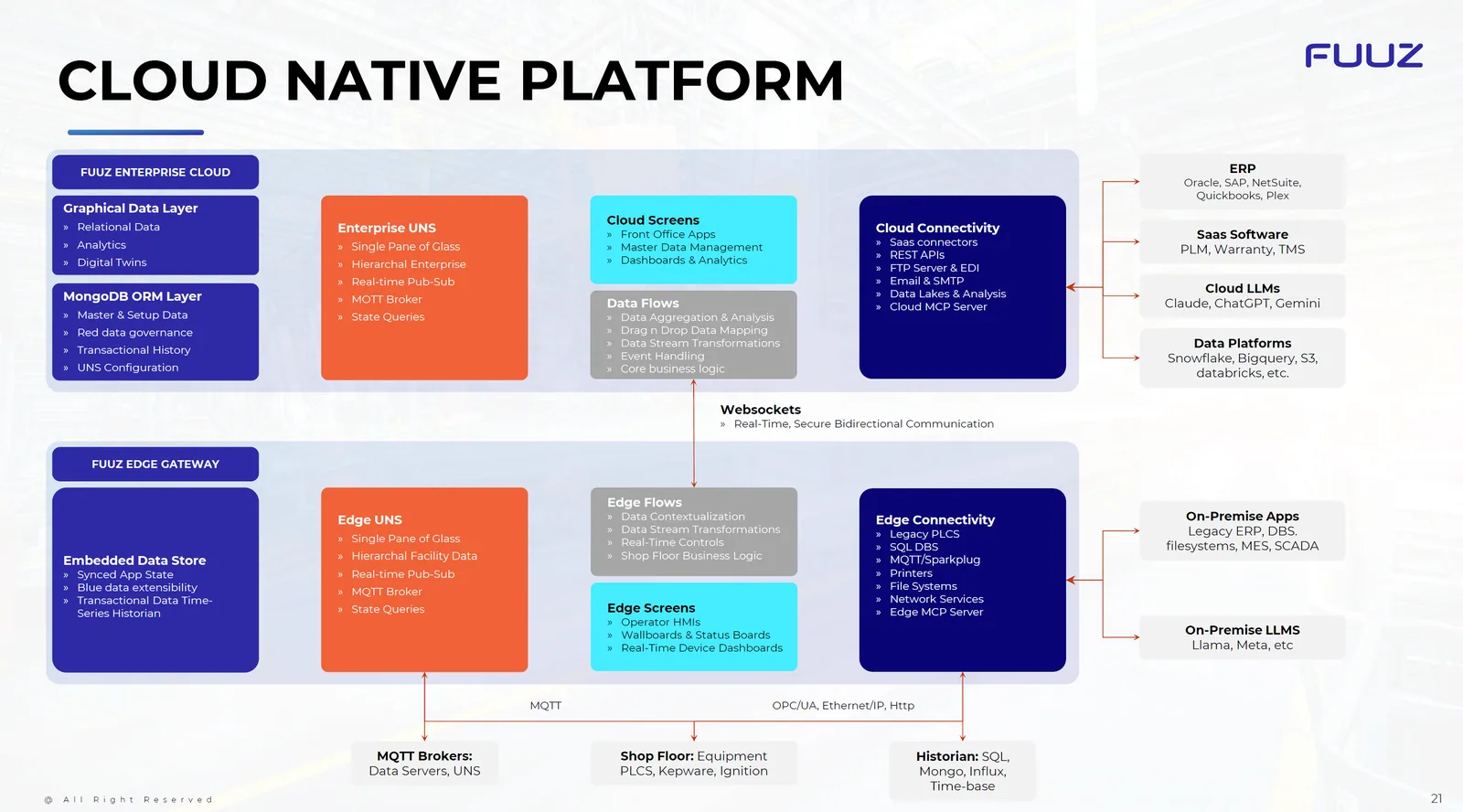
Enterprise Cloud (Fuuz Cloud)
Key cloud capabilities include a graphical data layer, an ORM on MongoDB, enterprise UNS, cloud screens, data flows, and connectivity to SaaS systems, APIs, EDI, data lakes, and MCP servers.
- Graphical Data Layer — Relational data, analytics, digital twins.
- MongoDB ORM Layer — Master/setup data, red-data governance, transactional history, UNS config.
- Enterprise UNS — Hierarchical enterprise, pub-sub, MQTT broker, state queries, single pane of glass.
- Cloud Screens — Front-office apps, MDM, dashboards/analytics.
- Data Flows — Aggregation, mapping, stream transforms, event handling, core business logic.
- Cloud Connectivity — SaaS connectors, REST APIs, FTP/EDI, SMTP, data lakes, Cloud MCP server.
Edge Gateway (Fuuz Edge)
At the edge, gateways provide embedded data stores, UNS, edge flows for contextualization and controls, operator HMIs, and connectivity to PLCs, historians, printers, file systems, and more.
- Embedded Data Store — Synced app state, blue-data extensibility, time-series historian.
- Edge UNS — Facility hierarchy, pub-sub, MQTT broker, state queries.
- Edge Flows — Contextualization, transforms, real-time controls, shop-floor business logic.
- Edge Screens — Operator HMIs, wallboards, device dashboards.
- Edge Connectivity — Legacy PLCs, SQL DBs, MQTT/Sparkplug, printers, file systems, network services, Edge MCP server.
Cloud–Edge Communications
- WebSockets — Real-time, secure bidirectional communication between cloud and edge.
- MQTT — Brokers and UNS data servers for resilient pub-sub; integrates with shop-floor systems (PLCs, Kepware, Ignition) and historians (SQL, Mongo, Influx).
- Industrial Protocols — OPC/UA, Ethernet/IP, HTTP for device and system interoperability.
[IMAGE PLACEHOLDER: Cloud–Edge data flow arrows]
Enterprise Integrations
Fuuz connects with ERP suites (Oracle, SAP, NetSuite, QuickBooks, Plex), PLM and SaaS systems, cloud LLMs (Claude, ChatGPT, Gemini), data platforms (Snowflake, BigQuery, S3, Databricks), and on-prem apps and LLMs (e.g., Llama).
Deployment Topologies & Lifecycle
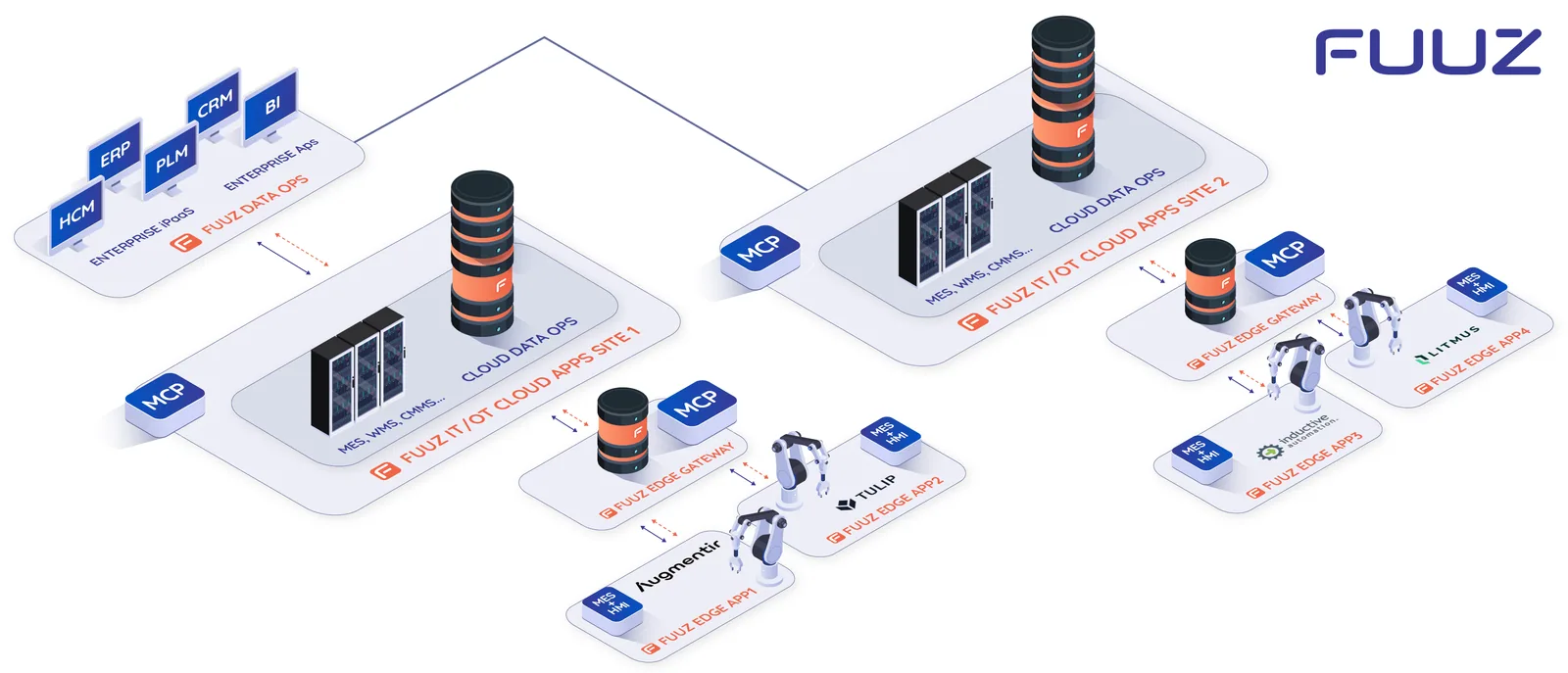
- Multiple Gateways — Gateways can be distributed per line, cell, site, or enterprise for resiliency and segmentation.
- Environment Parity — Plan Build, QA, and Production gateways that mirror cloud environments for controlled promotion and validation.
- Lifecycle Alignment — Gateways should follow the same release cadence and validation steps as cloud deployments (config, test, approve, promote).
Tip: Use Docker for containerized gateway services and Portainer templates to standardize and scale deployments across sites.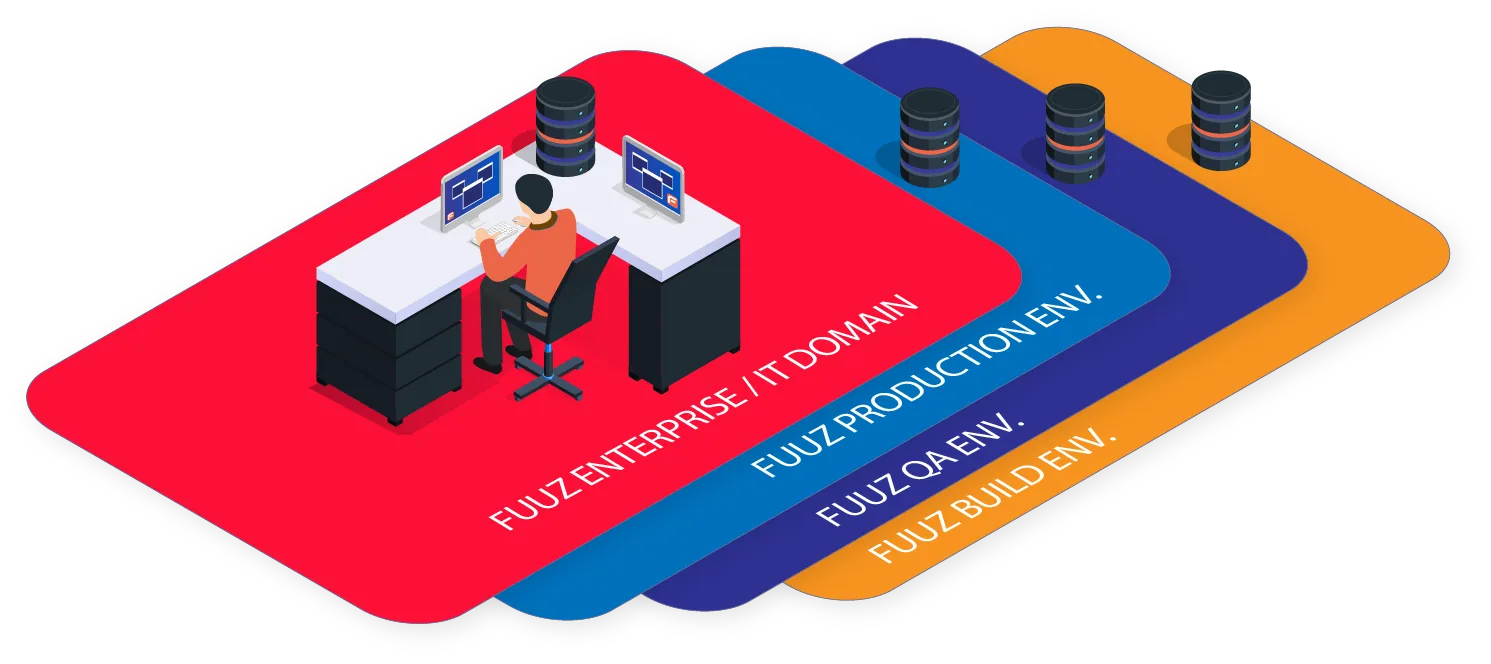
Recommended Deployment (Docker & Portainer)
- Prepare Hosts — Provision edge hosts (VM or bare metal) with modern Linux and Docker Engine installed.
- Install Portainer — Deploy Portainer CE/Business to centrally manage Docker hosts and templates.
- Template Library — Create Portainer templates for build, qa, and prod gateway stacks (compose files, env vars, secrets).
- Networking — Configure VLANs, firewall rules, MQTT broker endpoints, and secure outbound to Fuuz Cloud.
- Observability — Enable logs/metrics; use wallboards and dashboards for status and alerts.
- Promotion — Validate in build, then promote template and configs to QA and Production.
Security & Governance
- Role-Based Access — Cloud screens and edge HMIs honor enterprise roles and tenant boundaries.
- Data Governance — Red/blue data handling, compliance (e.g., SOC2, ITAR, CFR) within the platform.
- Resilience — Store-and-forward at the edge; pub-sub patterns for real-time reliability.
Troubleshooting & Tips
- Verify MQTT broker connectivity and certificates when links fail between cloud and edge.
- Check UNS topology (enterprise vs facility hierarchy) if data is misrouted.
Revision History
| Version | Date | Editor | Description |
|---|
| 1.0 | 2025-12-23 | Craig Scott | Initial Release |
Fuuz Knowledge Base • © 2025 Fuuz