 Help CenterHelp Center
Administer · App Management
Article Type: Concept
Audience: App Administrators, Application Designers, Developers
Module: App Management
Applies to Versions: All Versions
Application Configurations provide a flexible, schema-validated system for defining custom configuration data that extends beyond standard Application Settings. This feature enables App Administrators and Developers to create enterprise-grade solutions where business logic can be abstracted from application logic, allowing configuration changes in production environments without code deployment. Configurations support complex nested JSON structures with validated references to system and custom data models, making them ideal for multi-site deployments, dynamic workflows, and adaptable business rules.
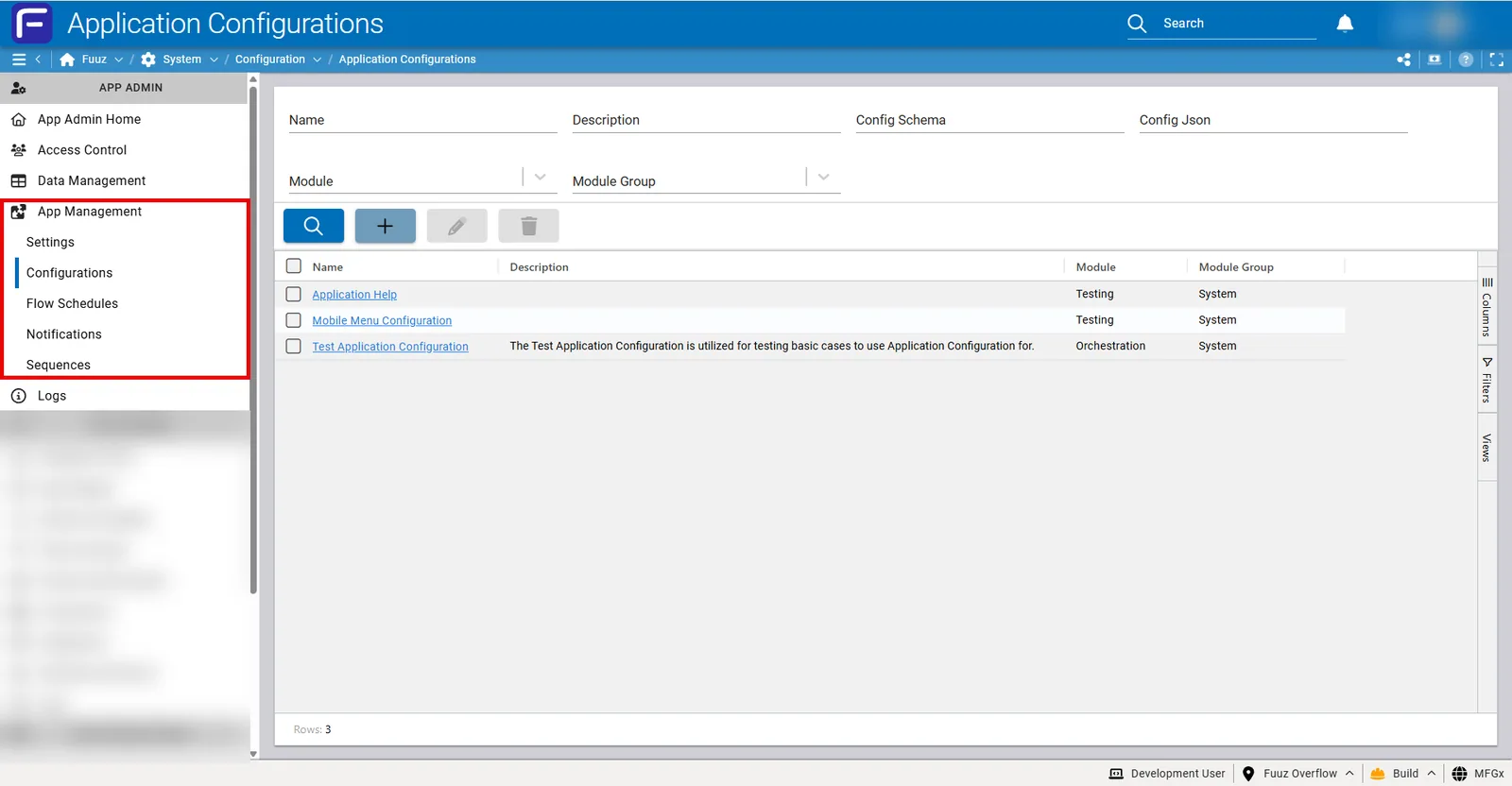
Note: Application Configurations are scoped per application and per environment. Unlike Application Settings which provide standardized system-wide preferences, Configurations allow fully customizable schema definitions tailored to specific business requirements. New applications have no configurations by default unless explicitly created.The Application Configurations screen is accessed via App Management > Configurations in the App Admin menu section.
The main table displays all available configurations with the following columns:
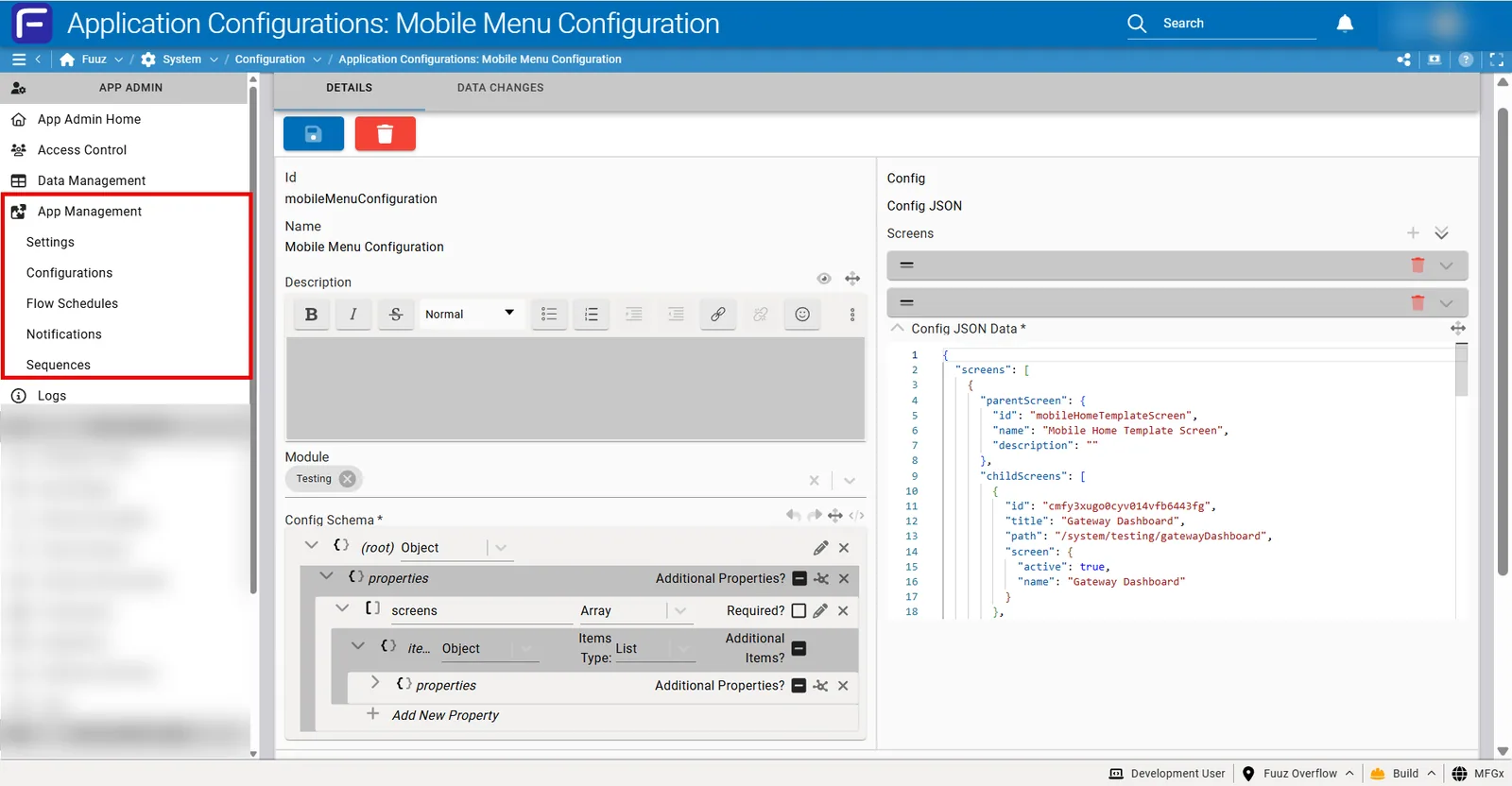
When creating or editing a configuration, the following fields are available:
Config Schema uses standard JSON Schema format with Fuuz-specific extensions for UI rendering and data model integration.
| Type | Description | Use Case |
|---|---|---|
| string | Text values | Names, descriptions, regex patterns, URLs |
| number | Numeric values (float or integer) | Thresholds, quantities, percentages |
| integer | Whole number values | Counts, IDs, port numbers |
| boolean | True/false flags | Feature toggles, enable/disable flags |
| object | Nested JSON object with properties | Complex structures, table references |
| array | Ordered list of items | Multiple selections, lists of records |
| null | Null/empty value | Optional fields with no default |
| any | Any valid JSON value type | Dynamic or polymorphic data |
Table references create validated dropdown selections from system or custom data models. When a user configures a field with a table reference, they select from actual records in the specified data model.
Input Props for Single Selection:
{
  "type": "object",
  "inputProps": {
    "type": "select",
    "dataModel": "Screen",
    "labelPath": "name",
    "labelField": "name",
    "stateTracking": "full",
    "multiselect": false,
    "selectFields": ["id", "name", "description"]
  }
}
Input Props for Multi-Selection:
{
  "type": "array",
  "items": {},
  "inputProps": {
    "type": "select",
    "dataModel": "Route",
    "labelPath": "title",
    "labelField": "title",
    "stateTracking": "full",
    "multiselect": true,
    "selectFields": ["id", "title", "path", "screen.active", "screen.name"]
  }
}| Parameter | Description |
|---|---|
type |
Input type (typically "select" for table references) |
dataModel |
Name of the data model to query (e.g., "Screen", "Route", "User", custom models) |
labelPath |
Field path displayed in dropdown (supports nested paths with dot notation) |
labelField |
Primary field for label display |
stateTracking |
Tracking mode for selected values (typically "full" to store complete record data) |
multiselect |
Boolean flag: true for array of selections, false for single selection |
selectFields |
Array of field paths to include in the configuration JSON (supports nested fields) |
Instead of table references, you can define embedded option lists that are validated within the configuration context only:
{
  "type": "string",
  "enum": ["Option1", "Option2", "Option3"]
}Use standard JSON Schema keywords to define required fields and defaults:
{
  "type": "object",
  "properties": {
    "requiredField": { "type": "string" },
    "optionalField": { "type": "string", "default": "defaultValue" }
  },
  "required": ["requiredField"]
}Application Configurations are accessible via standard GraphQL queries throughout the Fuuz platform.
Use GraphQL queries in screen data sources or component bindings to retrieve configuration data:
query {
  ApplicationConfiguration(name: "Mobile Menu Configuration") {
    configJson
  }
}Query configurations in flow nodes using GraphQL operations to retrieve configuration data for transformation or routing logic.
Access configurations via GraphQL queries in web flow nodes to dynamically adjust API responses or business logic based on configuration values.
Use the Fuuz GraphQL API endpoint to query configurations from external systems. Cross-tenant access is available via API if needed.
Use Case: Mobile menu configuration that defines parent screens and their associated child screen routes.
Configuration Metadata:
Config Schema:
{
  "type": "object",
  "properties": {
    "screens": {
      "type": "array",
      "items": {
        "type": "object",
        "properties": {
          "parentScreen": {
            "writeOnly": false,
            "readOnly": false,
            "deprecated": false,
            "examples": [],
            "minProperties": 0,
            "inputProps": {
              "type": "select",
              "dataModel": "Screen",
              "labelPath": "name",
              "labelField": "name",
              "stateTracking": "full",
              "multiselect": false,
              "selectFields": ["id", "name", "description"]
            },
            "type": "object"
          },
          "childScreens": {
            "writeOnly": false,
            "readOnly": false,
            "deprecated": false,
            "examples": [],
            "minItems": 0,
            "uniqueItems": false,
            "inputProps": {
              "type": "select",
              "dataModel": "Route",
              "labelPath": "title",
              "labelField": "title",
              "stateTracking": "full",
              "multiselect": true,
              "selectFields": [
                "id", "title", "path",
                "screen.active", "screen.name"
              ]
            },
            "type": "array",
            "items": {}
          }
        }
      }
    }
  }
}
Config Json:
{
  "screens": [
    {
      "parentScreen": {
        "id": "mobileHomeTemplateScreen",
        "name": "Mobile Home Template Screen",
        "description": ""
      },
      "childScreens": [
        {
          "id": "cmfy3xugo0cyv014vfb6443fg",
          "title": "Gateway Dashboard",
          "path": "/system/testing/gatewayDashboard",
          "screen": {
            "active": true,
            "name": "Gateway Dashboard"
          }
        },
        {
          "id": "cmfy3bjqp0bc80149gruo1g92",
          "title": "Application Dashboard",
          "path": "/system/testing/applicationDashboard",
          "screen": {
            "active": true,
            "name": "Application Dashboard"
          }
        }
      ]
    }
  ]
}
Accessing in Screen:
/* GraphQL Query in Screen Data Source */
query {
  ApplicationConfiguration(name: "Mobile Menu Configuration") {
    configJson
  }
}

/* JSONata to extract child screens for first parent */
$config := $ApplicationConfiguration.configJson;
$config.screens[0].childScreens
| Issue | Cause | Resolution |
|---|---|---|
| Cannot save configuration - schema validation error | Config Json does not conform to the defined Config Schema | Review the validation error message which indicates the specific schema violation. Verify that all required fields are present, data types match the schema, and nested structures follow the defined pattern. Use a JSON validator to check syntax before attempting to save. |
| Configuration not appearing in GraphQL queries | Configuration may be in wrong environment or query syntax incorrect | Verify you are querying the correct environment (configurations are per-environment). Check the configuration name spelling exactly matches. Use the API Tree Browser to explore available ApplicationConfiguration queries. |
| Table reference dropdown is empty | Referenced data model has no records or access permissions issue | Verify the data model specified in inputProps.dataModel contains records. Check that your user has permission to read from the referenced data model. Ensure the dataModel name is spelled correctly. |
| Configuration changes not reflected in production | Configurations do not automatically replicate across environments | Manually update the configuration in the production environment, or include the configuration in a migration package and deploy to production. Remember that this non-replication is intentional to allow environment-specific configurations. |
| Complex nested structure causing performance issues | Configuration JSON is excessively large or deeply nested | Consider breaking large configurations into multiple smaller configurations. Use GraphQL query selectFields to retrieve only necessary data. Cache configuration data in screen or flow state rather than querying repeatedly. |
| Regex pattern in configuration not working as expected | Regex string may need escaping in JSON or pattern is incorrect | Store regex patterns as strings in configuration JSON. When using in flows or screens, ensure proper escaping for backslashes (use \\ instead of \). Test regex patterns outside Fuuz first, then add validation in flows to catch pattern errors. |
| Unable to modify configuration - access denied | Only App Admins and Developers can create/modify configurations | Verify you have App Admin or Developer access type. End users and other access types cannot modify configurations even if they have roles. Contact your administrator to grant appropriate access. |
| Need to rollback configuration to previous version | No automatic rollback feature available | Navigate to Data Management > Data Changes. Filter by ApplicationConfiguration data model and locate the configuration record. Review the change history to see previous JSON values. Copy the previous JSON value and manually update the configuration. |
| Schema changes breaking existing Config Json | Modified schema no longer validates existing configuration data | Before modifying Config Schema, test with sample JSON to ensure compatibility. When schema changes are necessary, update Config Json simultaneously to maintain compliance. Consider creating a new configuration rather than modifying existing if significant schema changes are required. |
| Configuration not included in package deployment | Configuration not selected for package inclusion | When creating packages, explicitly include configurations in the package definition. If using Module and Module Group, ensure all configurations within the module are selected. Verify package contents before deployment. |
| Version | Date | Editor | Description |
|---|---|---|---|
| 1.0 | 2024-12-27 | Craig Scott | Initial Release |